
1. System Call
The interface between the operating system and the user programs is defined by the set of "extended instructions" that the operating system provides. These extended instructions have been traditionally known as system calls, although they can be implemented in several ways. To really understand what operating systems do, we must examine this interface closely. The calls available in the interface vary from operating system to operating system (although the underlying concepts tend to be similar).
2. Processes
When a process is suspended temporarily like this, it must later be restarted in exactly the same state it had when it was stopped. This means that all information about the process must be explicitly saved somewhere during the suspension. For example, the process may have several files open for reading at once. Associated with each of these files is a pointer giving the current position (i.e., the number of the byte or record to be read next). When a process is temporarily suspended, all these pointers must be saved so that a read call executed after the process is restarted will read the proper data. In many operating systems, all the information about each process, other than the contents of its own address space, is stored in an operating system table called the process table, which is an array (or linked list) of structures, one for each process currently in existence.
3.Files
The other broad category of system calls relates to the file system. As noted before, a major function of the operating system is to hide the peculiarities of the disks and other I/O devices and present the programmer with a nice, clean abstract model of device-independent files. System calls are obviously needed to create files, remove files, read files, and write files. Before a file can be read, it must be opened, and after it has been read it should be closed, so calls are provided to do these things.
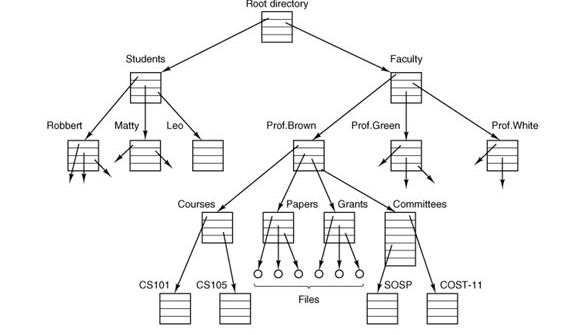
To provide a place to keep files, MINIX 3 has the concept of a directory as a way of grouping files together. A student, for example, might have one directory for each course he is taking (for the programs needed for that course), another directory for his electronic mail, and still another directory for his World Wide Web home page. System calls are then needed to create and remove directories. Calls are also provided to put an existing file into a directory, and to remove a file from a directory. Directory entries may be either files or other directories. This model also gives rise to a hierarchythe file systemas shown in
Figure 1-6. A file system for a university
department.
4.The Shell
The operating system is the code that carries out the system calls. Editors, compilers, assemblers, linkers, and command interpreters definitely are not part of the operating system, even though they are important and useful. At the risk of confusing things somewhat, in this section we will look briefly at the MINIX 3 command interpreter, called the shell. Although it is not part of the operating system, it makes heavy use of many operating system features and thus serves as a good example of how the system calls can be used. It is also the primary interface between a user sitting at his terminal and the operating system, unless the user is using a graphical user interface. Many shells exist, including csh, ksh, zsh, and bash. All of them support the functionality described below, which derives from the original shell (sh).
When any user logs in, a shell is started up. The shell has the terminal as standard input and standard output. It starts out by typing the prompt, a character such as a dollar sign, which tells the user that the shell is waiting to accept a command. If the user now types.
4.The Shell
The operating system is the code that carries out the system calls. Editors, compilers, assemblers, linkers, and command interpreters definitely are not part of the operating system, even though they are important and useful. At the risk of confusing things somewhat, in this section we will look briefly at the MINIX 3 command interpreter, called the shell. Although it is not part of the operating system, it makes heavy use of many operating system features and thus serves as a good example of how the system calls can be used. It is also the primary interface between a user sitting at his terminal and the operating system, unless the user is using a graphical user interface. Many shells exist, including csh, ksh, zsh, and bash. All of them support the functionality described below, which derives from the original shell (sh).
When any user logs in, a shell is started up. The shell has the terminal as standard input and standard output. It starts out by typing the prompt, a character such as a dollar sign, which tells the user that the shell is waiting to accept a command. If the user now types.

