
10.3、应用案例
Web.xml文件
<?xml version="1.0" encoding="UTF-8"?> <web-app xmlns:xsi="http://www.w3.org/2001/XMLSchema-instance" xmlns="http://xmlns.jcp.org/xml/ns/javaee" xsi:schemaLocation="http://xmlns.jcp.org/xml/ns/javaee http://xmlns.jcp.org/xml/ns/javaee/web-app_3_1.xsd" id="WebApp_ID" version="3.1"> <servlet> <servlet-name>springmvc</servlet-name> <servlet-class> org.springframework.web.servlet.DispatcherServlet </servlet-class> <init-param> <param-name>contextConfigLocation</param-name> <param-value>classpath:springmvc-config.xml</param-value> </init-param> <load-on-startup>1</load-on-startup> </servlet> <servlet-mapping> <servlet-name>springmvc</servlet-name> <url-pattern>/</url-pattern> </servlet-mapping> </web-app> |
springmvc-config.xml文件
<?xml version="1.0" encoding="UTF-8"?> <beans xmlns="http://www.springframework.org/schema/beans" xmlns:mvc="http://www.springframework.org/schema/mvc" xmlns:xsi="http://www.w3.org/2001/XMLSchema-instance" xmlns:context="http://www.springframework.org/schema/context" xsi:schemaLocation="http://www.springframework.org/schema/beans http://www.springframework.org/schema/beans/spring-beans-4.3.xsd http://www.springframework.org/schema/mvc http://www.springframework.org/schema/mvc/spring-mvc-4.3.xsd http://www.springframework.org/schema/context http://www.springframework.org/schema/context/spring-context-4.3.xsd"> <!-- 定义组件扫描器,指定需要扫描的包 --> <context:component-scan base-package="controller" /> <!--配置注解驱动 --> <mvc:annotation-driven /> <!-- 定义视图解析器 --> <bean id="viewResolver" class= "org.springframework.web.servlet.view.InternalResourceViewResolver"> <!-- 设置前缀 --> <property name="prefix" value="/" /> <!-- 设置后缀 --> <property name="suffix" value=".jsp" /> </bean> <!-- 配置文件上传解析器 MultipartResolver --> <bean id="multipartResolver" class= "org.springframework.web.multipart.commons.CommonsMultipartResolver"> <!-- 设置请求编码格式--> <property name="defaultEncoding" value="UTF-8" /> </bean> </beans> |
在这里我们配置了一个文件上传解析器 MultipartResolver,解析器所使用的类org.springframework.web.multipart.commons.CommonsMultipartResolver位于包spring-web-4.3.6.RELEASE.jar中。
上传表单文件fileUpload.jsp
<%@ page language="java" contentType="text/html; charset=UTF-8" pageEncoding="UTF-8"%> <!DOCTYPE html> <html> <head> <meta http-equiv="Content-Type" content="text/html; charset=UTF-8"> <title>文件上传</title> </head> <body> <form action="uploadFile" method="post" enctype="multipart/form-data"> 请选择文件:<input id="file" type="file" name="uploadfile" multiple="multiple" /><br /> <input type="submit" value="上传" /> </form> </body> </html> |
在表单中,我们method="post"表明表单将传送大量数据,同时我们设置 属性enctype的值为"multipart/form-data"表明将要传送二进制数据文件。 Action属性值为"uploadFile",这个URL我们将在控制器类里面进行定义。运行程序并在浏览器中输入http://localhost:8080/springMVCFileUpload/fileUpload.jsp程序运行如下图:

点击浏览按钮选择图片文件并点击打开,结果如下:

我们可以看到选中的文件路径显示在文本框中。这时候我们点击上传按钮,就可以把选中的文件提交到服务器,由服务器上的控制器类进行处理。
控制器类FileUploadController.java文件代码如下:
package controller; import java.io.File; import java.io.IOException; import java.util.List; import java.util.UUID; import javax.servlet.http.HttpServletRequest; import org.springframework.stereotype.Controller; import org.springframework.web.bind.annotation.RequestMapping; import org.springframework.web.bind.annotation.RequestParam; import org.springframework.web.multipart.MultipartFile; @Controller public class FileUploadController { @RequestMapping("/uploadFile") public String uploadFile(HttpServletRequest request, List<MultipartFile> uploadfile){ if(!uploadfile.isEmpty()&&uploadfile.size()>0){ MultipartFile file=uploadfile.get(0); String filename=file.getOriginalFilename(); String dirpath=request.getServletContext().getRealPath("/uploadfile/"); String newFileName=UUID.randomUUID()+"_"+filename; try { file.transferTo(new File(dirpath+newFileName)); } catch (IllegalStateException e) { e.printStackTrace(); } catch (IOException e) { e.printStackTrace(); } } return ""; } } |
在这个控制器类里面有一个被注解为@RequestMapping("/uploadFile")的方法
public String uploadFile(HttpServletRequest request, List<MultipartFile> uploadfiles)
该方法有两个参数request和uploadfiles。其中参数request用来获取当前URL对应的服务器物理路径,由于表单文件域元素<input type="file" name="uploadfile" multiple="multiple"/>的属性multiple值为"multiple",说明这个文件域是可以提交多个文件的,因此参数uploadfiles用来绑定表单提交过来的文件集合。
假定用户只提交了一个文件,我们的代码MultipartFile file=uploadfiles.get(0);表明我们取出其中的第一个文件,代码String filename=file.getOriginalFilename();表明我们取出文件的文件名,代码String dirpath=request.getServletContext().getRealPath("/uploadfile/");获取当前URL的物理路径,代码String newFileName=UUID.randomUUID()+"_"+filename;使用UUID是通用唯一识别码(Universally Unique Identifier),UUID可以让系统中的所有元素,都能有唯一的辨识信息,有效文件重名问题。代码file.transferTo(new File(dirpath+newFileName));则将文件存储到服务器中。
运行程序后打开服务器目录(不是工程目录),在文件夹uploadfile中我们可以看到上传的文件。
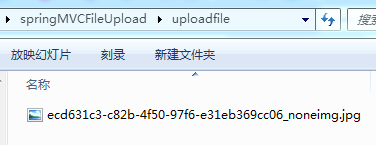
注意:1、文件上传到的是服务器目录,不是工程目录;2、文件已经被命名为新的名称。

