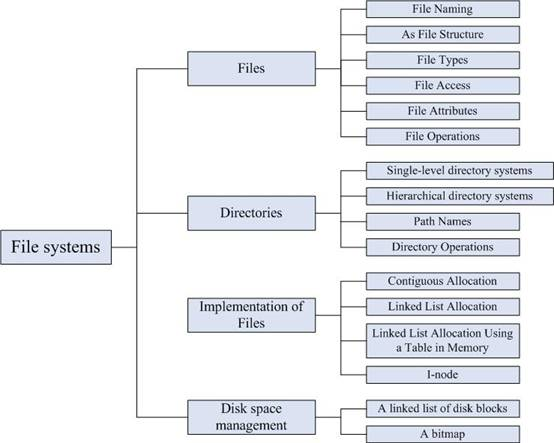
文件管理模块主要介绍了文件和目录的相关概念;文件系统的实现方法;磁盘空间管理等内容。
After studying this chapter, you should be able to:
(1) Master: the concepts of file and directory; absolute path name; relative path name; implementing files; free disk space management.
(2) Understand: file naming; file types; file access; file attributes; file operations; hierarchical directory systems; directory operations.
(3) Know: file system layout.
Basic
1. Files
2. Directories
3. File system implementation
4. Disk space management
Emphasis
1. The concepts of files and directories
2. Implementing Files
3. Free disk space management
Difficulty
1. File structure
2. absolute path name and relative path name
1. Files
The usual solution to all these problems is to store information on disks and other external media in units called files.
(1) File Naming
File naming
File extension: many operating systems support two-part file names, with the two parts separated by a period, as in p.c. the part following the period is called the file extension and usually indicates something about the file.
(2) File Structure
· Byte sequence
· Record sequence
· Tree
(3) File Types
· Regular files: regular files are the ones that contain user information.
· Directories: are system files for maintaining the structure of the file system: Unix also has character and lock special files.
· Character files: are related to input/output and used to model serial I/O devices, such as terminals, printers, and networks.
· Block files: are used to model disks.
· ASCII files: consist of lines of text. Lines need not all be of the same length.
· binary files: usually, they have some internal structure known to programs that use then and an executable file or an archive.
(4) File Access
· Sequential access
· Random access
(5) File Attributes
(6) File Operations
· Create
· Delete
· Open
· Close
· Read
· Write
· Append
· Seek
· Get attributes
· Set Attributes
· Rename
2. Directories
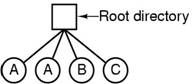
(1) Single-level directory systems
The simplest form of directory system is having one directory containing all the files.
(2) Hierarchical directory systems
There can be as many directories as are needed to group the files in natural ways.
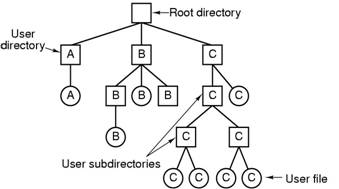
(3) Path Names
· Absolute path name: consisting of the path from the root directory to the file.
· Relative path name: consisting of the path from the working directory (current directory) to the file.
(4) Directory Operations
· Create
· Delete
· Opendir
· Closedir
· Readdir
· Rename
· Link
· Unlink
3. File System Implementation
(1) File system layout
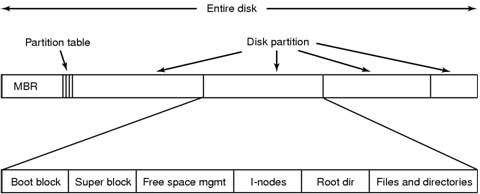
(2) Implementing Files
· Contiguous Allocation: store each file as a contiguous run of disk blocks
· Linked List Allocation: Keep each one as a linked list of disk blocks.
· Linked List Allocation Using a Table in Memory: FAT
· I-nodes: each file with a data structure called an I-node, which lists the attributes and disk addresses of the files blocks.
4. Disk Space Management
(1) A linked list of disk blocks
The method is with each block holding as many free disk block numbers as will fit, as shown Fig. 10 (a).
(2) A bitmap
A disk with n blocks requires a bitmap with n bits. Free bocks are represented by 1s in the map, allocated blocks by 0s( or vice versa).
Ⅰ.Select the correct answer
1. ( ) are system files for maintaining the structure of the file system.
A. Block special files B. Character special files
C. Regular files D. Directories
Answer: D
2. The OS provides two ways of file access: random access and ( ) access.
A.streaming B.series
C.sequence D.sequential
Answer: C
3. A file must be ( a ) before used, and should be ( b ) after access.
a A.named B.created
C.opened D.backuped
b A.released B.closed
C.uninstalled D.backuped
Answer: C, B
4. Which of the following is not a file operation? ( )
A. Opendir B. Create C. Delete D. Rename
Answer: A
Ⅱ.On a system that mounts file systems on individual devices into a single file system, a floppy device has been mounted at point /mnt. If the floppy’s file system contains a file by the name of /home/user/data, what will that file’s name be in the overall file system?
Answer: /mnt/home/usere/data
 Ⅲ.The following figure is a file allocation table in main memory, please write out: which disk blocks does file-A use? Which disk blocks does file B use? Which disk blocks does file C use?
Answer:
1. File A uses disk blocks 4, 7, 2, 10 and 12;
2. File B uses disk blocks 6, 3, 11 and 14;
3. File C uses disk blocks 8, 0, 9, 1 and 13
1. Consider the directory tree of the following figure. If /usr/jim is the working directory, what is the absolute path name for the file whose relative path name is ../ast/x?
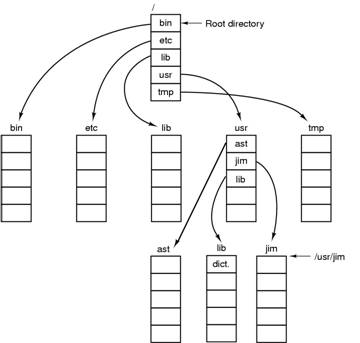
Solution: /usr/ast/x
2. Free disk space can be kept track of using a free list or a bitmap. Disk addresses require D bits. For a disk with B blocks, F of which are free, state the condition under which the free list uses space than the bitmap. For D having the value 16 bits, express your answer as a percentage of the disk space that must be free.
Solution:
(1) B>FD or FD<B orB/F>D
1. F/B<1/D, D=16, so, F/B<1/16,so the percentage of the free disk space is 6.25%
3. The beginning of a free space bitmap looks like this after the disk partition is first formatted: 1000 0000 0000 0000 (the first block is used by the root directory). The system always searches for free blocks starting at the lowest-numbered block, so after writing file A , which uses six blocks, the bitmap looks like this: 1111 1110 0000 0000. Show the bitmap after each of the following additional actions:
(a) File B is written, using five blocks
(b) File A is deleted
(c) File C is written, using eight blocks
(d) File B is deleted
Solution:
1. 1111 1111 1111 0000
2. 1000 0001 1111 0000
3. 1111 1111 1111 1100
4. 1111 1110 0000 1100
Q: On a system using index access, what should happen if no record matches the index value in a read request?
A: Typically, the read request fails with an error code indicating that no matching record was found.
Q: One of the file attributes is the record length. Why does the operating system ever care about this?
A: The operating system cares about record length when files can be structured as records with keys at a specific position within each record and it is possible to ask for a record with a given key. In that case, the system has to know how big the records are so it can search each one for the key.
Q: Is the open system call in unix absolutely essential? What would the consequences be of not having it?
A: To start with, if there were no open, on every read it would be necessary to specify the name of the file to be opened. The system would then have to fetch the i-node for it, although that could be cached. One issue that quickly arises is when to flush the i-node back to disk. It could time out, however. It would be a bit clumsy, but it might work.