
目录

  • 1 Android说课
    • 1.1 课程简介
    • 1.2 课程的定位与目标
    • 1.3 课程的设计理念与思路
    • 1.4 课程内容的选取与教学组织的安排
    • 1.5 课程的教学模式与教学方法
    • 1.6 课程教学资料
    • 1.7 课程特色
  • 2 Android项目结构
    • 2.1 项目开发
  • 3 Button的用法
    • 3.1 Button的用法
    • 3.2 内部类方法处理按钮单击事件
  • 4 Android入门
    • 4.1 Android的发展史
    • 4.2 Android的系统构架
    • 4.3 搭建Android开发环境
    • 4.4 创建Android应用程序
  • 5 Activity初步
    • 5.1 Activity启动流程
    • 5.2 Activity与布局文件间的关系
    • 5.3 Activity当中获取代表控件对象
  • 6 AcitonBar与菜单
    • 6.1 ActionBar的作用
    • 6.2 各版本的菜单对比
  • 7 控件布局
    • 7.1 控制布局的概念
    • 7.2 相对布局管理器
  • 8 Activity详解
    • 8.1 Actibity初步
    • 8.2 认识Intent
  • 9 列表控件
    • 9.1 Android列表用途
    • 9.2 用ArrayAdapter显示数据
    • 9.3 列表项布局设计
    • 9.4 下拉视图Spinner
  • 10 对话框
    • 10.1 Toast提示框
    • 10.2 Dialog对话框
    • 10.3 特色对话框
    • 10.4 自定义对话框
    • 10.5 构建Notification
  • 11 Service
    • 11.1 关于service
    • 11.2 范例:定义后台服务
    • 11.3 剪贴板服务
  • 12 Android线程
    • 12.1 message,looper, handler类的关系
    • 12.2 范例:消息传递 —— 自动更新文本
  • 13 Pending Intent
    • 13.1 认识PendingIntent
    • 13.2 范例:发送通知 —— Notification
  • 14 广播机制:Broadcast
    • 14.1 范例:广播组件的定义结构
  • 15 存储数据
    • 15.1 SharedPreferences存储
    • 15.2 文件存储
    • 15.3 SQLite数据库存储
    • 15.4 ContentProvider存储
    • 15.5 网络存储
范例:发送通知 —— Notification

Notification类的常用方法

No. 方法 类型 描述

1 public Notification(int icon, CharSequence tickerText, long when) 构造 创建一个新的Notification对象,并指定提示的图标、信息内容及显示的时间,如果为立刻显示,则直接使用System.currentTimeMillis()设置

2 public void setLatestEventInfo(Context context, CharSequence contentTitle, CharSequence contentText, PendingIntent contentIntent) 普通 设置通知的标题、内容、以及指定的PendingIntent

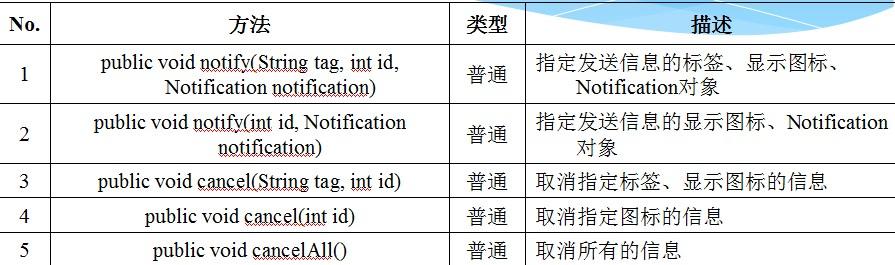
NotificationManager类的常用方法定义Activity程序发送Notification信息


  • public class MyNotificationDemo extends Activity {@Overridepublic void onCreate(Bundle savedInstanceState) {super.onCreate(savedInstanceState); // 父类方法super.setContentView(R.layout.main); // 默认布局管理器


  • NotificationManager notificationManager = (NotificationManager) super.getSystemService(Activity.NOTIFICATION_SERVICE); // 取得系统服务


  • Notification notification = new Notification( // 实例化对象R.drawable.pic_m, // 信息图标“来自电子信息学院的消息。", // 信息提示System.currentTimeMillis()); // 显示时间

  • PendingIntent contentIntent =PendingIntent.getActivity(this, 0,super.getIntent(), // 取得IntentPendingIntent.FLAG_UPDATE_CURRENT);


  • // 取PendingIntentnotification.setLatestEventInfo(this, “电子信息学院", // 信息标题“电子信息学院(www.stiei.edu.cn)", // 信息内容contentIntent);


  • // 待发送的IntentnotificationManager.notify(“stiei", // 设置信息标签R.drawable.pic_m, // 设置图标notification); // 发送信息}

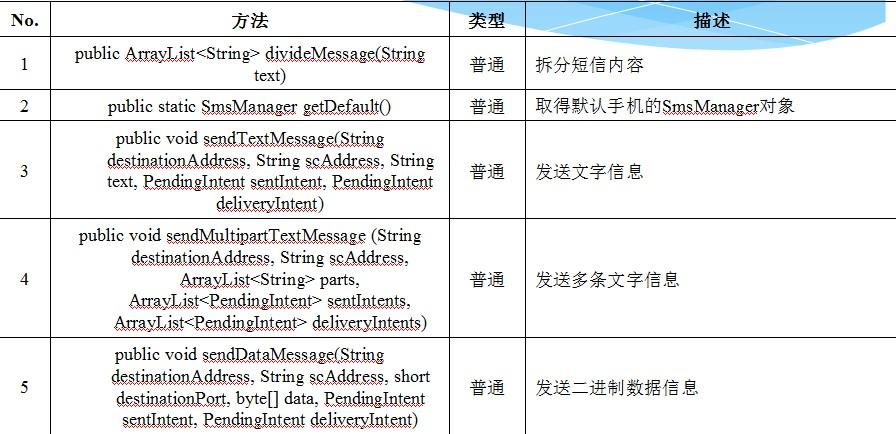
    SmsManager类的常用方法


    在项部状态栏显示系统通知