
【实验1】 Hybrid接口的复杂应用
实验目的:
1. 理解华为交换机的端口类型
2. 学习Hybrid接口的配置方法
3. 理解VLAN数据帧传输过程中的标签携带
实验拓扑:
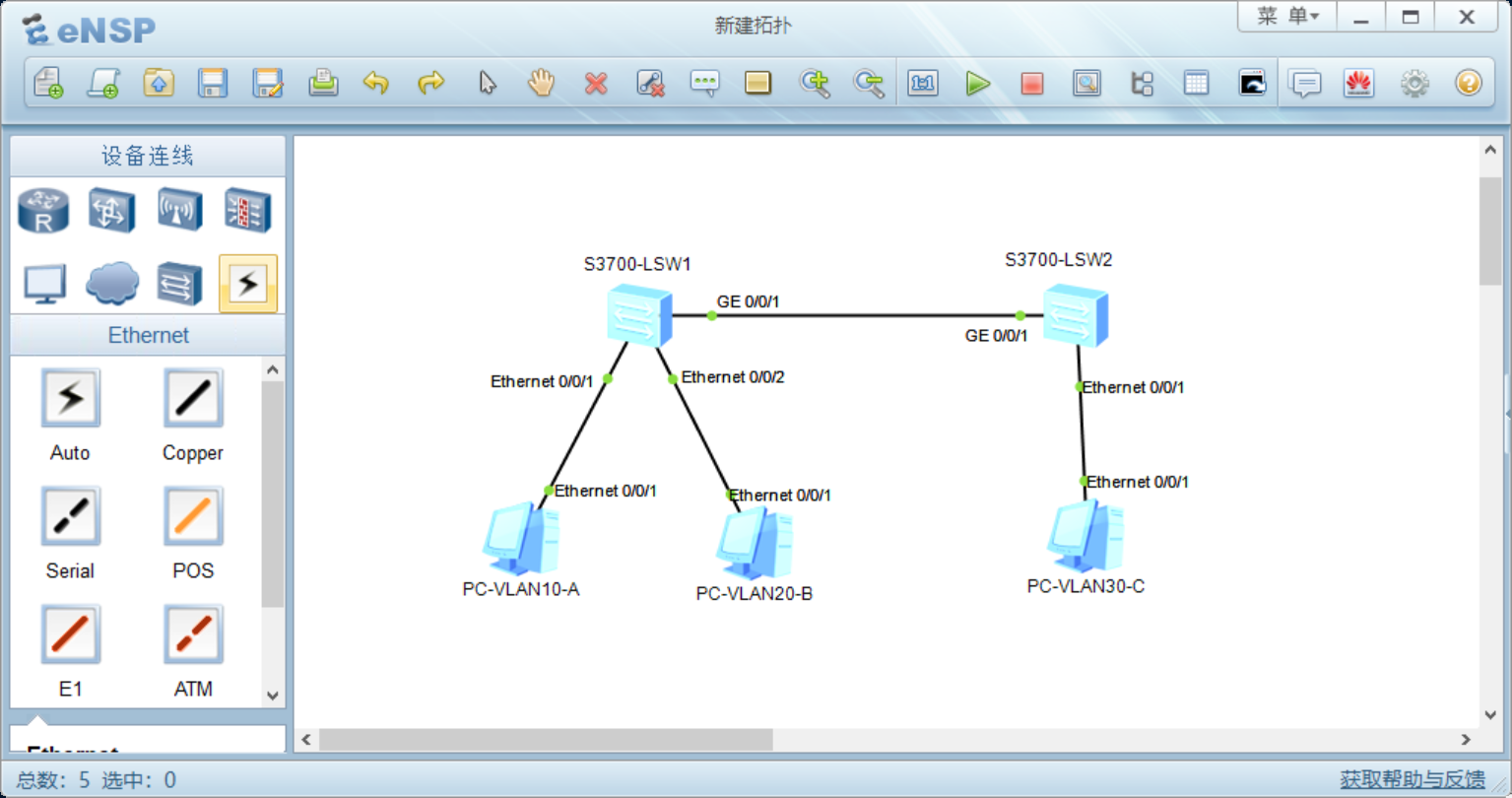
【华为eNSP虚拟仿真软件】可通过官方网站下载或从老师的百度网盘中下载
链接:https://pan.baidu.com/s/1J3qD5_dzFQWvVnWPJn-pig
提取密码:cxyg
【网络教学环境下开展实验的方法】
【实验过程讲解】
下载 [RS_LAB_1_Hybrid.zip] 到本地后,解压缩,找到扩展名为paper的文件,然后以“学号_姓名_实验1”命名:
如“11414080903103_何鹏基_实验1.paper”
打开按照要求完成实验,涉及网络设备的实验完成后需退回用户视图,输入save命名,回车,再输入Y,回车,继续回车,如下所示
<Huawei>save
The current configuration will be written to the device.
Are you sure to continue?[Y/N] y
Info: Please input the file name ( *.cfg, *.zip ) [vrpcfg.zip]:
Mar 28 2019 08:25:05-08:00 Huawei %%01CFM/4/SAVE(l)[0]:The user chose Y when dec
iding whether to save the configuration to the device.
Now saving the current configuration to the slot 0.
Save the configuration successfully.
<Huawei>
点击交卷,输入ID号(学号),文件名“学号_姓名_实验x”,得到一个以.ans为扩展名的文件。
将【学号_姓名_实验1.ans】文件与【实验1报告】一同上传至【第1次实验】中。
另外,提交前也可通过eNSP模拟器的“菜单-考试-阅卷”先检查自己的完成情况,检查时需添加
标准答案文件路径:(见压缩中扩展名为.model文件)
学生答案保存路径:(自己完成的【学号_姓名_实验1.ans】文件)
检查认可后可将完成的【学号_姓名_实验1.ans】答案文件上传到【第1次实验】中。
实验步骤:
1.按拓扑图连接,并配置PCA、PCB、PCC的IP地址分别为192.168.10.10/24、192.168.10.20/24、192.168.10.30/24。在LSW2的GE0/0/1和Ethernet00/0/1上开启 抓包程序并测试连通性。
2.在LSW1上虚拟局域网,分别为10、20、30。将所有端口都设置为hybrid类 型。并将Ethernet00/0/1、Ethernet00/0/2的PVID分别设置为10、20;并将Ethernet00/0/1端口转发的VLAN10、VLAN30数据帧标签摘除;Ethernet00/0/2端 口转发的VLAN20、VLAN30数据帧标签摘除。并让GigabitEthernet 0/0/1端口在 转发VLAN10、VLAN20、VLAN30数据帧时携带标签。
3.在LSW2上虚拟局域网,分别为10、20、30。将所有端口都设置为hybrid类 型。并将Ethernet00/0/1的PVID分别设置为30;并将Ethernet00/0/1端口转发的VLAN10、VLAN20、VLAN30数据帧标签摘除;并让GigabitEthernet 0/0/1端口在转发VLAN10、VLAN20、VLAN30数据帧时携带标签。
4.在LSW2的GE0/0/1和Ethernet00/0/1上开启抓包程序并测试PCA、PCB、PCC三 台主机之间的连通性。
参考教材中的 P57。
按拓扑图连接,并配置PCA、PCB、PCC的IP地址分别为192.168.10.10/24、192.168.10.20/24、192.168.10.30/24。测试连通性;
PC>PING 192.168.10.20
Ping 192.168.10.20: 32data bytes, Press Ctrl_C to break
From 192.168.10.20:bytes=32 seq=1 ttl=128 time=47 ms
From 192.168.10.20:bytes=32 seq=2 ttl=128 time=47 ms
From 192.168.10.20:bytes=32 seq=3 ttl=128 time=47 ms
From 192.168.10.20:bytes=32 seq=4 ttl=128 time=62 ms
From 192.168.10.20:bytes=32 seq=5 ttl=128 time=31 ms
--- 192.168.10.20 pingstatistics ---
5 packet(s) transmitted
5 packet(s) received
0.00% packet loss
round-trip min/avg/max = 31/46/62 ms
PC>PING 192.168.10.30
Ping 192.168.10.30: 32data bytes, Press Ctrl_C to break
From 192.168.10.30:bytes=32 seq=1 ttl=128 time=63 ms
From 192.168.10.30:bytes=32 seq=2 ttl=128 time=62 ms
From 192.168.10.30:bytes=32 seq=3 ttl=128 time=94 ms
From 192.168.10.30:bytes=32 seq=4 ttl=128 time=63 ms
From 192.168.10.30:bytes=32 seq=5 ttl=128 time=62 ms
--- 192.168.10.30 pingstatistics ---
5 packet(s) transmitted
5 packet(s) received
0.00% packet loss
round-trip min/avg/max = 62/68/94 ms
2.
<LSW1>system-view
Enter system view,return user view with Ctrl+Z.
[LSW1]undo info-centerenable
Info: Information centeris disabled.
[LSW1]sysname LSW1
[LSW1]vlan batch 10 2030
Info: This operation maytake a few seconds. Please wait for a moment...done.
[LSW1]interface Ethernet0/0/1
[LSW1-Ethernet0/0/1]portlink-type hybrid
[LSW1-Ethernet0/0/1]porthybrid pvid vlan 10
[LSW1-Ethernet0/0/1]porthybrid untagged vlan 10 30
[LSW1-Ethernet0/0/1]quit
[LSW1]
[LSW1]interface Ethernet0/0/2
[LSW1-Ethernet0/0/2]portlink-type hybrid
[LSW1-Ethernet0/0/2]porthybrid pvid vlan 20
[LSW1-Ethernet0/0/2]porthybrid untagged vlan 20 30
[LSW1-Ethernet0/0/2]quit
[LSW1]
[LSW1]interfaceGigabitEthernet 0/0/1
[LSW1-GigabitEthernet0/0/1]portlink-type hybrid
[LSW1-GigabitEthernet0/0/1]porthybrid tagged vlan 10 20 30
[LSW1-GigabitEthernet0/0/1]quit
[LSW1]
<Huawei>system-view
Enter system view,return user view with Ctrl+Z.
[Huawei]undo info-centerenable
Info: Information centeris disabled.
[Huawei]sysname LSW2
[LSW2]vlan batch 10 2030
Info: This operation maytake a few seconds. Please wait for a moment...done.
[LSW2]interface Ethernet0/0/1
[LSW2-Ethernet0/0/1]portlink-type hybrid
[LSW2-Ethernet0/0/1]porthybrid pvid vlan 30
[LSW2-Ethernet0/0/1]porthybrid untagged vlan 10 20 30
[LSW2-Ethernet0/0/1]quit
[LSW2]
[LSW2]
[LSW2]interfaceGigabitEthernet 0/0/1
[LSW2-GigabitEthernet0/0/1]portlink-type hybrid
[LSW2-GigabitEthernet0/0/1]porthybrid tagged vlan 10 20 30
[LSW2-GigabitEthernet0/0/1]quit
[LSW2]
测试连通性
PC>PING 192.168.10.20
Ping 192.168.10.20: 32data bytes, Press Ctrl_C to break
From 192.168.10.10:Destination host unreachable
From 192.168.10.10:Destination host unreachable
From 192.168.10.10:Destination host unreachable
From 192.168.10.10:Destination host unreachable
From 192.168.10.10:Destination host unreachable
--- 192.168.10.20 pingstatistics ---
5 packet(s) transmitted
0 packet(s) received
100.00% packet loss
PC>PING 192.168.10.30
Ping 192.168.10.30: 32data bytes, Press Ctrl_C to break
From 192.168.10.30:bytes=32 seq=1 ttl=128 time=78 ms
From 192.168.10.30:bytes=32 seq=2 ttl=128 time=63 ms
From 192.168.10.30:bytes=32 seq=3 ttl=128 time=62 ms
From 192.168.10.30:bytes=32 seq=4 ttl=128 time=47 ms
From 192.168.10.30:bytes=32 seq=5 ttl=128 time=62 ms
--- 192.168.10.30 pingstatistics ---
5 packet(s) transmitted
5 packet(s) received
0.00% packet loss
round-trip min/avg/max = 47/62/78 ms
PCB测试到PCA、PCC
PC>ping 192.168.10.10
Ping 192.168.10.10: 32data bytes, Press Ctrl_C to break
From 192.168.10.20:Destination host unreachable
From 192.168.10.20:Destination host unreachable
From 192.168.10.20:Destination host unreachable
From 192.168.10.20:Destination host unreachable
From 192.168.10.20:Destination host unreachable
--- 192.168.10.10 pingstatistics ---
5 packet(s) transmitted
0 packet(s) received
100.00% packet loss
PC>ping 192.168.10.30
Ping 192.168.10.30: 32data bytes, Press Ctrl_C to break
From 192.168.10.30:bytes=32 seq=1 ttl=128 time=63 ms
From 192.168.10.30:bytes=32 seq=2 ttl=128 time=46 ms
From 192.168.10.30:bytes=32 seq=3 ttl=128 time=63 ms
From 192.168.10.30:bytes=32 seq=4 ttl=128 time=47 ms
From 192.168.10.30:bytes=32 seq=5 ttl=128 time=62 ms
--- 192.168.10.30 pingstatistics ---
5 packet(s) transmitted
5 packet(s) received
0.00% packet loss
round-trip min/avg/max = 46/56/63 ms
PC>
PCC测试到PCA、PCB
PC>ping 192.168.10.10
Ping 192.168.10.10: 32data bytes, Press Ctrl_C to break
From 192.168.10.10:bytes=32 seq=1 ttl=128 time=62 ms
From 192.168.10.10:bytes=32 seq=2 ttl=128 time=78 ms
From 192.168.10.10:bytes=32 seq=3 ttl=128 time=78 ms
From 192.168.10.10:bytes=32 seq=4 ttl=128 time=47 ms
From 192.168.10.10:bytes=32 seq=5 ttl=128 time=78 ms
--- 192.168.10.10 pingstatistics ---
5 packet(s) transmitted
5 packet(s) received
0.00% packet loss
round-trip min/avg/max = 47/68/78 ms
PC>ping 192.168.10.20
Ping 192.168.10.20: 32data bytes, Press Ctrl_C to break
From 192.168.10.20:bytes=32 seq=1 ttl=128 time=78 ms
From 192.168.10.20:bytes=32 seq=2 ttl=128 time=62 ms
From 192.168.10.20:bytes=32 seq=3 ttl=128 time=79 ms
From 192.168.10.20:bytes=32 seq=4 ttl=128 time=78 ms
From 192.168.10.20:bytes=32 seq=5 ttl=128 time=62 ms
--- 192.168.10.20 pingstatistics ---
5 packet(s) transmitted
5 packet(s) received
0.00% packet loss
round-trip min/avg/max = 62/71/79 ms
PC>
思考:
查阅资料,看看其它不同产商的交换机中端口有哪些工作模式?能否完成相应的实验?

