
【实验5】 RIP路由协议进阶实验
【提示:请各位同学下载后打开RS_LAB_5_RipAuthentication.paper,并按实验要求完成本次实验,每台网络设备实验完成后在普通视图下[如<AR1>]用save命令保存,结束后请点击右下方的[交卷],并用自己的[学号-姓名]作为考生ID号保存答案,并将答案文件[如:1514080903111_陈真_实验5.ans]上传到FTP://10.101.144.183/自己的班级目录中。】
实验目的:
1.学会使用调试命令
2.理解路由汇总概念及方法
3.理解RIP路由协议的工作过程,路由表的更新机制
4.了解路由环路、水平分割、毒性反转、消极端口等概念
实验拓扑图:
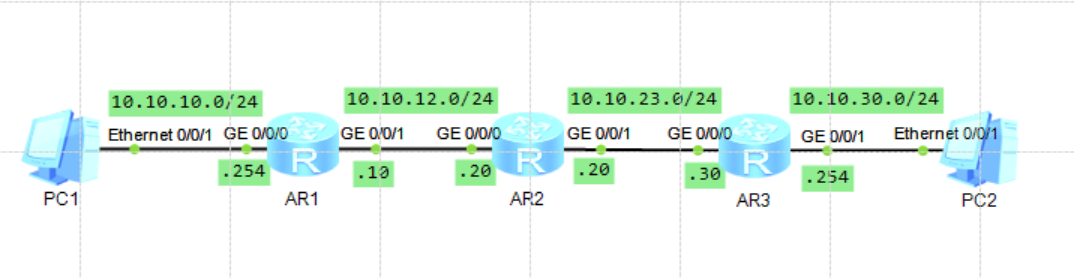
实验步骤:
1.各设备名称及其端口IP地址如下表:
设备 | 端口 | IP地址 |
| PC1 | Ethernet0/0/1 | 10.10.10.10/24 |
| AR1 | GE0/0/0 | 10.10.10.254/24 |
| AR1 | GE0/0/1 | 10.10.12.10/24 |
| AR2 | GE0/0/0 | 10.10.12.20/24 |
| AR2 | GE0/0/1 | 10.10.23.20/24 |
| AR3 | GE0/0/0 | 10.10.23.30/24 |
| AR3 | GE0/0/1 | 10.10.30.254/24 |
| AR3 | Loopback0 | 10.10.31.31/24 |
| PC2 | Ethernet0/0/1 | 10.10.30.30/24 |
2.配置RIP V2路由协议,使全网连通;查看AR2的路由表;
[系统视图]display ip routing-table protocol rip
3.测试PC1到PC2连通性;并用wireshark观察所捕获的RIP协议分组。
4.在所有路由器上取消自动汇总;
[路由视图]undo summary
5.在AR2和AR3之间进行明文验证;
[接口视图]rip authentication-mode simple huawei_lab5
6.设定AR1的GE0/0/1为消极端口;
[路由视图]silent-interface GigabitEthernet 0/0/1
参考答案:
<Huawei>system-view
Entersystem view, return user view with Ctrl+Z.
[Huawei]sysname AR1
[AR1]interface GigabitEthernet 0/0/0
[AR1-GigabitEthernet0/0/0]ip address 10.10.10.254 24
Nov14 2018 09:40:07-08:00 AR1 %%01IFNET/4/LINK_STATE(l)[2]:The line protocol IP
on the interface GigabitEthernet0/0/0 hasentered the UP state.
[AR1-GigabitEthernet0/0/0]
[AR1-GigabitEthernet0/0/0]quit
[AR1]interface GigabitEthernet 0/0/1
[AR1-GigabitEthernet0/0/1]ip address 10.10.12.10 24
[AR1-GigabitEthernet0/0/1]quit
[AR1]rip
[AR1-rip-1]version 2
[AR1-rip-1]silent-interface GigabitEthernet 0/0/1
[AR1-rip-1]network 10.0.0.0
[AR1-rip-1]undo summary
[AR1-rip-1]quit
[AR1]quit
<AR1>save
The current configuration will be written tothe device.
Are you sure to continue? (y/n)[n]:y
It will take several minutes to saveconfiguration file, please wait........
Configuration file had been savedsuccessfully
Note: The configuration file will take effectafter being activated
<AR1>
<Huawei>system-view
Entersystem view, return user view with Ctrl+Z.
[Huawei]sysname AR2
[AR2]interface GigabitEthernet 0/0/0
[AR2-GigabitEthernet0/0/0]
[AR2-GigabitEthernet0/0/0]ip address 10.10.12.20 24
Nov14 2018 09:39:26-08:00 AR2 %%01IFNET/4/LINK_STATE(l)[0]:The line protocol IP
on the interface GigabitEthernet0/0/0 hasentered the UP state.
[AR2-GigabitEthernet0/0/0]
[AR2-GigabitEthernet0/0/0]quit
[AR2]interface GigabitEthernet 0/0/1
[AR2-GigabitEthernet0/0/1]ip address 10.10.23.20 24
[AR2-GigabitEthernet0/0/1]rip authentication-mode simple huawei_lab5
[AR2-GigabitEthernet0/0/1]quit
[AR2]rip
[AR2-rip-1]version 2
[AR2-rip-1]network 10.0.0.0
[AR2-rip-1]undo summary
[AR2-rip-1]quit
[AR2]quit
<AR2>save
The current configuration will be written tothe device.
Are you sure to continue? (y/n)[n]:y
It will take several minutes to saveconfiguration file, please wait.......
Configuration file had been savedsuccessfully
Note: The configuration file will take effectafter being activated
<AR2>
<Huawei>
Nov14 2018 09:39:07-08:00 Huawei %%01IFPDT/4/IF_STATE(l)[0]:Interface GigabitEt
hernet0/0/0has turned into UP state.
<Huawei>
Nov14 2018 09:39:07-08:00 Huawei %%01IFPDT/4/IF_STATE(l)[1]:Interface GigabitEt
hernet0/0/1has turned into UP state.
<Huawei>system-view
Entersystem view, return user view with Ctrl+Z.
[Huawei]sysname AR3
[AR3]interface GigabitEthernet 0/0/0
[AR3-GigabitEthernet0/0/0]ip address 10.10.23.30 24
Nov14 2018 09:39:13-08:00 AR3 %%01IFNET/4/LINK_STATE(l)[2]:The line protocol IP
on the interface GigabitEthernet0/0/0 hasentered the UP state.
[AR3-GigabitEthernet0/0/0]rip authentication-mode simple huawei_lab5
[AR3-GigabitEthernet0/0/0]quit
[AR3]interface GigabitEthernet 0/0/1
[AR3-GigabitEthernet0/0/1]ip address 10.10.30.254 24
[AR3-GigabitEthernet0/0/1]quit
[AR3]interface loopback 0
[AR3-LoopBack0]ip address 10.10.31.31 24
[AR3-LoopBack0]quit
[AR3]rip
[AR3-rip-1]version 2
[AR3-rip-1]network 10.0.0.0
[AR3-rip-1]undo summary
[AR3-rip-1]quit
[AR3]quit
<AR3>save
The current configuration will be written tothe device.
Are you sure to continue? (y/n)[n]:y
It will take several minutes to saveconfiguration file, please wait........
Configuration file had been savedsuccessfully
Note: The configuration file will take effectafter being activated
<AR3>

